
Skill Capped UI – Best PvP Addons & UI Setup Guide for WoW Midnight
Set up the ultimate PvP interface for WoW Midnight with Skill Capped UI. Complete guide covering nameplates, arena frames, cooldown tracking, and all essential addons configured in one click.
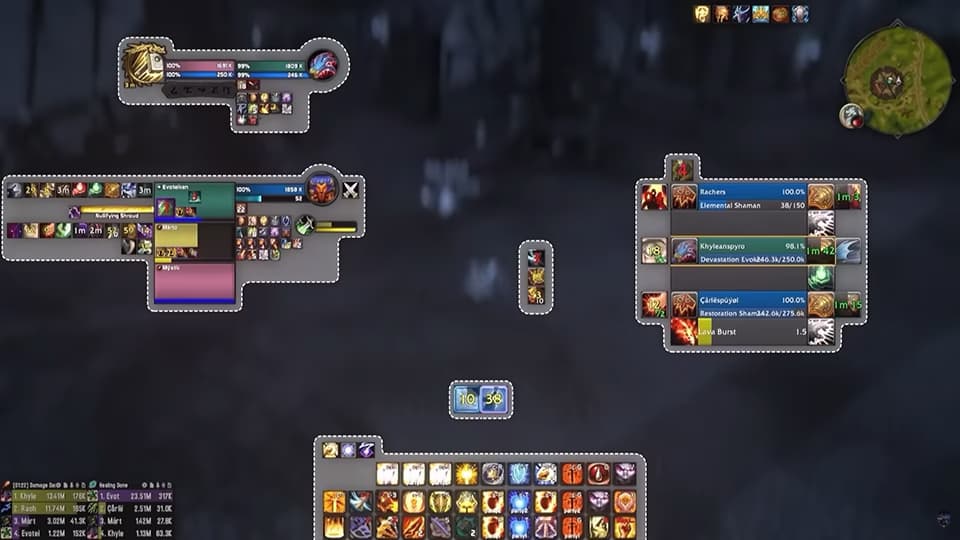
The #1 PvP Addon Package
One-click install for pro-level UI
- ✓Complete addon suite: arena frames, cooldown manager, nameplates, and more
- ✓Premium profiles: in-game BiS list and talent imports
- ✓Setup in seconds: look like a pro instantly
✦ Exclusive discount applied at checkout • Money-back guarantee
Welcome to Skill Capped's Guide on Setting Up The Best WoW PvP Addons Using Skill Capped UI. This PvP addon will be your cheat code for optimizing your gameplay in WoW Midnight. Throughout this guide, we will provide you a step by step process of how to install our premium PvP UI, and a brief description of Skill Capped's customized profiles for each addon.
Introduction
So, what is the Skill-Capped UI addon and the benefit of installing it? Skill Capped has created a custom pre-built UI, allowing an easier visualization to what is occurring in any PvP scenario. Our addon will automatically configure the profiles of other popular PvP addons, removing the hassle of setting up your UI on multiple characters.
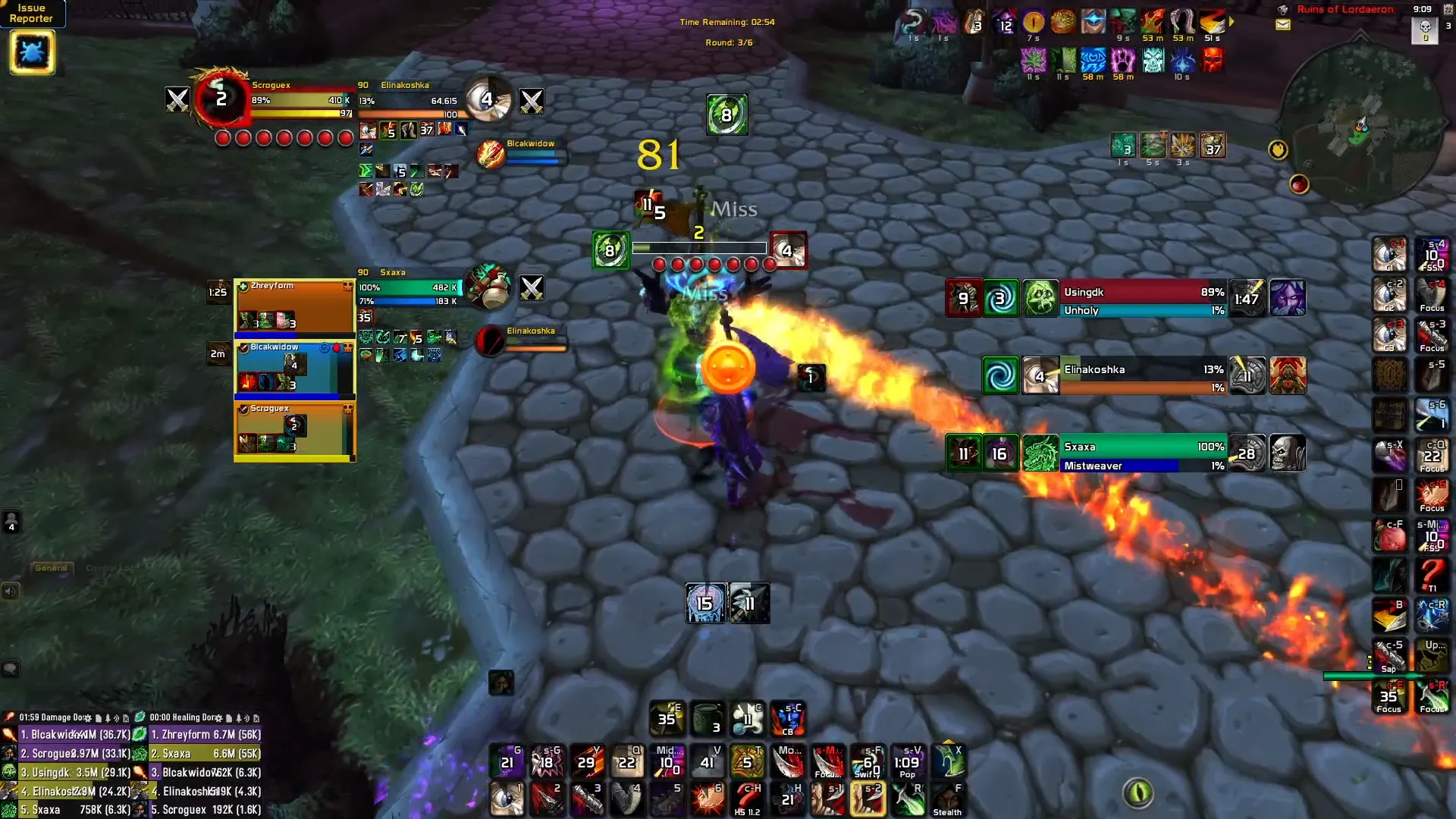
These customized addons will optimize your performance in PvP. If you don't prefer a certain addon included in our package, you have the option when opening your World of Warcraft client to remove any addons you choose. If you want to add extra features onto our UI addon, we have premium, exclusive addons that can be obtained when becoming a premium Skill Capped subscriber.
In order to understand what makes this so essential to use for all PvPers, we will go over a brief overview of the addons that are equipped with our UI package.
Installation
Getting set up with Skill Capped UI is quick and easy. Follow these steps:
- Go to the Addons page on our retail website
- Follow the instructions to download and install our addon pack, or get each addon individually on CurseForge
- Skill-Capped UI download link on CurseForge: Skill Capped UI
- Enter your Battle.net tag to generate your premium code
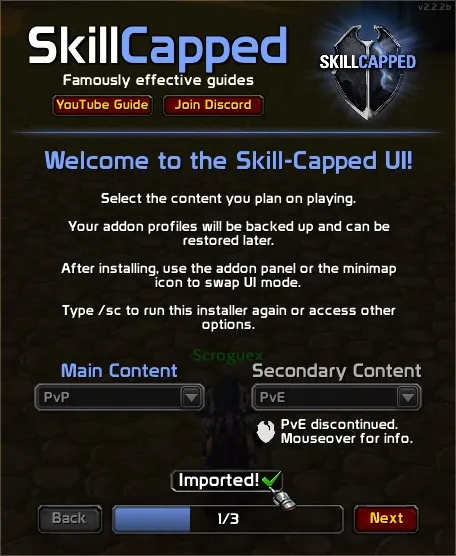
- Select which profiles you want to install and click Install
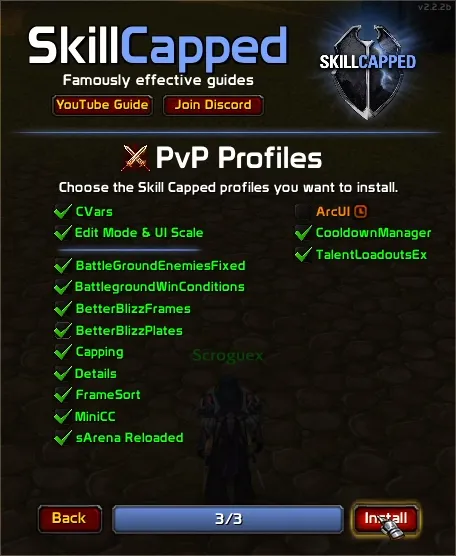
You can also follow the video guide on our site to help get yourself setup and join our Discord server to access our addon support channel where our team is available to help troubleshoot any issues you may be having.
Core Addon Profiles
These are the essential addons that come pre-configured with Skill Capped UI. Each one has been carefully tuned for optimal PvP performance.
Our BetterBlizzPlates profile gives you a familiar feel for PvP nameplates.
Download: BetterBlizzPlates on CurseForge
This includes DoT effects, slows, and maintenance debuffs on the top of enemy nameplates, and any applied Crowd Control directly on the right side of enemy nameplates. Having these categories separated makes it easy to distinguish information. There is also a white border that is featured when targeting a player, making it easier to visualize what target you are currently on without having to look at your target player frame.
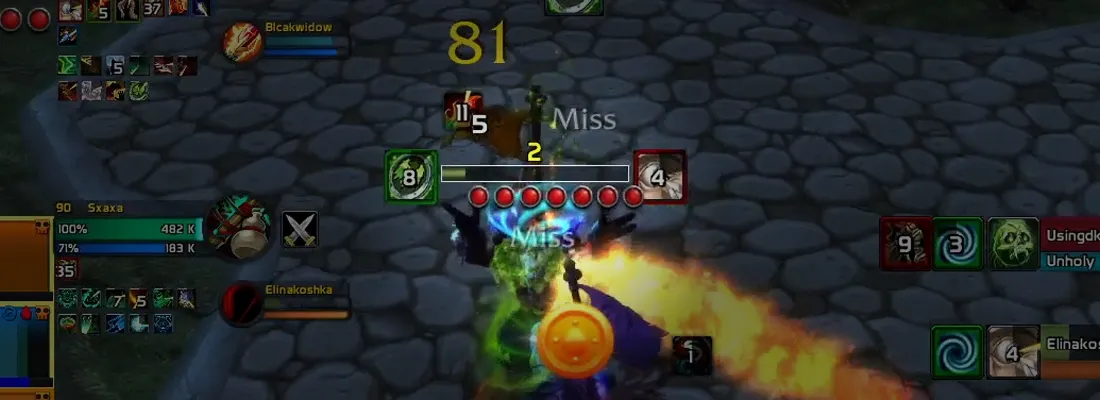
Friendly target icons are above friendly nameplates. This makes it easy to know where your teammate is, and is especially beneficial for Healers. There is a combo point indicator underneath your enemy target, allowing you to see how many current combo points you have available. This profile also has the numbers 1, 2, and 3 above their nameplate, helping you know what enemy player will be affected by your arena 1, arena 2, and arena 3 macros.
BetterBlizzFrames helps reduce visual clutter, and allows for more visual customization of unit frames.
Download: BetterBlizzFrames on CurseForge
It even features some quality of life improvements, such as a combat indicator notifying when Rogues can Sap, and when Healers can drink.
This addon is the new standard for arena frames in Midnight.
Download: sArena Reloaded on CurseForge
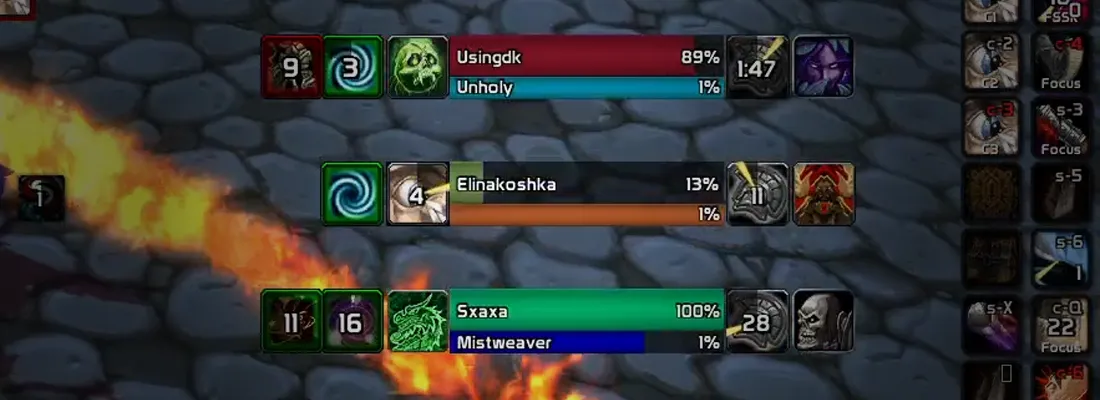
Our profile has diminishing return categories visible to the left of Health Bars, and the cast bar margin has been increased. This makes it easier to notice casted spells at a quick glance. The position of our dispel and racial icons have also been rearranged so these do not overlap.
This has replaced several addons at once, including BigDebuffs, OmniBar, and even WeakAuras.
Download: MiniCC on CurseForge
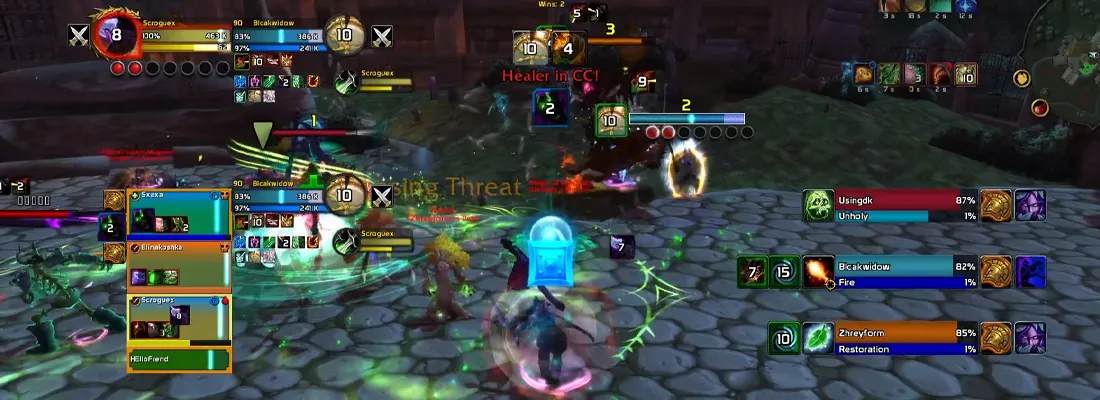
MiniCC includes buff and debuff clarity, cooldown tracking, and even alerts for key events like enemy offensive CDs and a notification when your healer is in crowd control.
MiniCC consolidates what used to require BigDebuffs, OmniBar, and WeakAuras into a single lightweight addon. This means less configuration and fewer potential addon conflicts.
Having FrameSort automatically places your character at the bottom of your raid frames.
Download: FrameSort on CurseForge
This makes it easier to visually determine the number of your party member, and is specifically helpful when using your party1 and party2 macros.
Premium Addon Profiles
If you want to add extra features onto our UI addon, these premium, exclusive addons can be obtained when becoming a premium Skill Capped subscriber.
ArcUI is a premium addon profile available exclusively to Skill Capped members.
Download: ArcUI on CurseForge
This addon profile requires an active Skill Capped subscription. Enter your Battle.net tag when setting up the installer to unlock premium profiles.
Talent Loadout Ex is a premium addon profile available exclusively to Skill Capped members. It provides enhanced talent management for quickly swapping between PvP builds.
Download: Talent Loadout Ex on CurseForge
This addon profile requires an active Skill Capped subscription. Enter your Battle.net tag when setting up the installer to unlock premium profiles.
Battleground Addon Profiles
These addons are exclusively helpful when playing in either Random or Rated Battlegrounds.
This will help you to target enemy players anywhere on the map in any battleground. Think of it as the "sArena" for battleground content.
Download: BattleGroundEnemies Fixed on CurseForge
We recommend moving it to the same location as your arena frames for consistency.
Edit Mode & CVar Settings
Another important feature that makes sure everything is neatly packaged together on your screen is with Edit Mode. This makes sure our important UI elements are positioned in the center of our screen. This includes having our raid frames and focus frame to be at the same peripheral distance of your gladius.
CVar Settings
Our addon also configures hidden settings that optimize your PvP experience:
| Setting | What It Does |
|---|---|
| Spell Queue Window | Set to your current Latency + 100. This adjusts the window of your next predicted spell cast. |
| Pets in Raid Frames | Pets are now included in raid frames. |
| Script Errors | Disables script errors that pop up on your screen. |
| Combat Text | Disables combat text on your portrait to eliminate visual clutter. |
| Projected Textures | Reduces projected textures to easily see AoE effects, such as Ring of Frost. |
| Graphics Settings | Adjusts graphic settings, removing any visual clutter from arena maps. |
| Camera Distance | Provides an increase to the maximum camera distance, and sets camera to never adjust. |
| Target of Target | Your target of target is automatically enabled, and includes sticky targeting. Sticky targeting makes sure that you keep targeting and attacking a target if you accidentally mis-click on the ground. |
| Instant Quest Text | Enabled for faster leveling. |
| Auto Loot | Automatically enabled in your settings. |
Extra Selectable Options
Skill Capped UI also provides extra selectable options, which include:
- Adding an elite icon to your player frame
- Updating your fonts
- A sound notification when queue is ready
Summary
| Category | Addon | Purpose |
|---|---|---|
| Nameplates | BetterBlizzPlates | DoT, CC, and debuff tracking on nameplates |
| Unit Frames | BetterBlizzFrames | Reduced clutter, combat indicators |
| Arena Frames | sArena Reloaded | DR tracking, cast bars, dispel/racial icons |
| Cooldown Tracking | MiniCC | Replaces BigDebuffs, OmniBar, and WeakAuras |
| Raid Frames | FrameSort | Consistent raid frame ordering for macros |
| Damage Meters | Details | Damage and healing breakdowns |
| Premium | ArcUI | Exclusive UI addon for subscribers |
| Premium | Talent Loadout Ex | Enhanced talent management for PvP |
| Battlegrounds | BattleGroundEnemies Fixed | Enemy targeting in battlegrounds |
| Battlegrounds | Battleground Win Conditions | Objective tracking and win conditions |
| Battlegrounds | Capping BG Timers | Battleground objective timers |
| Settings | Edit Mode & CVars | Optimized positioning and hidden settings |
Skip ALL of these steps and download the #1 UI for PvP with the click of a button. Visit the Skill Capped Addons page to get started, or download Skill Capped UI on CurseForge directly.

Master PvP with Skill Capped
Premium video courses for every spec
- ✓Hundreds of video guides: beginner to Gladiator courses
- ✓Pro strategies: learn from multi-R1 players
- ✓Exclusive arena commentaries: strategies from the pros
✦ Exclusive discount applied at checkout • Money-back guarantee