
Skill Capped UI – Best PvP Addons & UI Setup Guide for MoP Classic
Set up the perfect PvP interface for Mists of Pandaria Classic with Skill Capped UI. Complete guide covering nameplates, arena frames, cooldown tracking, WeakAuras, and all essential addons.
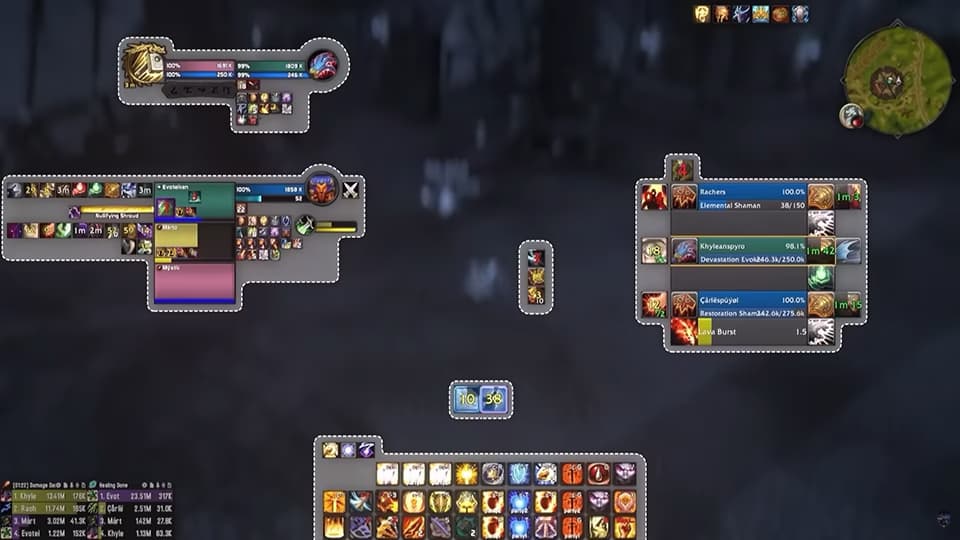
The #1 PvP Addon Package
One-click install for pro-level UI
- ✓Complete addon suite: arena frames, WeakAuras, nameplates, and more
- ✓Premium profiles: custom filters for OmniBar, OmniCD, and BBP!
- ✓Setup in seconds: look like a pro instantly
✦ Exclusive discount applied at checkout • Money-back guarantee
This guide will walk you step by step on how to PERFECTLY set up your UI for Mists of Pandaria PvP. Whether you want to save hours of time with our one-click installer or configure everything manually, we have you covered.
Stats & Optimization
Before even stepping foot into arena, you need to make sure your stats are perfect. In MoP, reforging is a powerful tool that lets you convert secondary stats to hit exact breakpoints.
If you're the type of person who loves to min-max their character, you NEED ReforgeLite.
Download: ReforgeLite Classic on CurseForge
This addon will automatically give you the perfect stats by reforging your gear to the EXACT breakpoints. It's almost like magic, but there is a problem...
This addon is an absolute mess to navigate at first, and you will need to know your stat priority, including specific breakpoints. All of this information is available in our class guides.
How to Use ReforgeLite
- At the reforger, set the Target Level to PvP
- Uncheck any external buffs you won't have
- Enter your stat weights:
- Use 100 for your most important stat
- Then 80 for the next one
- Then 60, and so on following your stat priority
- Your least important stat should be the smallest number
- Enter your breakpoints (for example, if you want 12.52% haste, enter 5320)
- As a DPS, don't forget hit and expertise caps
- Hit Calculate, then Show, then Reforge
The addon will automatically reforge all of your gear.
Before you exit, be sure to SAVE your preset at the top so you can use it later. With the click of a button you now have THE perfect stats for PvP.
Nameplates & Unit Frames
Nameplates are a REALLY big deal in PvP. They're like a cheatcode to increase awareness and damage at the same time. Unfortunately, there is no "edit mode" in Mists of Pandaria, so you'll need addons to get that retail feel.
The default nameplates absolutely SUCK in Classic. Not to worry though because BetterBlizzPlates will fix EVERYTHING.
Download: BetterBlizzFrames on CurseForge
Once you're in game, type /bbp to bring up the options menu.
Retail-Style Nameplate Settings
If you want to make your nameplates look EXACTLY like they do on retail:
| Setting | Value |
|---|---|
| Size | 0.9 |
| Target Size | 1.2 |
| Height | 1.08 |
| Class Colored | ✓ Enabled |
| Width | 130 |
Indicators
Check the boxes to create icons for:
- Your healer
- Your partners
- Important pets
- Totem indicator (SUPER helpful in this expansion)
Nameplate Auras (Important!)
This next step is really important. In the NamePlate Auras tab, we're going to Whitelist our most important debuffs.
For example, as a Rogue, you want to track Rupture and Hemorrhage, but you don't really care about seeing your poisons or the "Master Poisoner" debuff.
To fix this:
- Go to the White List tab
- Add the Spell ID of your important abilities
- Check the first two boxes to only track your OWN debuffs
- This makes them bigger and easier to see
Filtering your debuffs is enormously beneficial for most specs and it WILL increase your damage if done right.
You can even show Combo Points on nameplates, which works for Rogues, Druids, Paladins, and Warlocks. This displays your secondary resources directly in front of you.
If you want to play with the UI you are already used to on retail, you're going to need BetterBlizzFrames. This is one of those addons you wish you knew about sooner.
Download: BetterBlizzFrames on CurseForge
Right out of the box, it might seem like nothing has changed, but let's type /bbf to pull up the window and adjust some important settings.
Essential Settings
Hide Arena Frames: This will hide Blizzard's default arena frames when you are using an addon like sArena. Enable this if you're using a separate arena frames addon.
LossOfControl (VERY Important): Make sure this is enabled. The "LoseControl" feature that is baked into retail is not part of the base UI in Classic, and this single feature is MASSIVELY beneficial for your awareness.
Optional Aesthetic Tweaks
- Class Colors on frames: Mimics the retail experience
- Bigger healthbars: Also mimics retail if you're into that
- Class icons instead of portraits: If you prefer that style
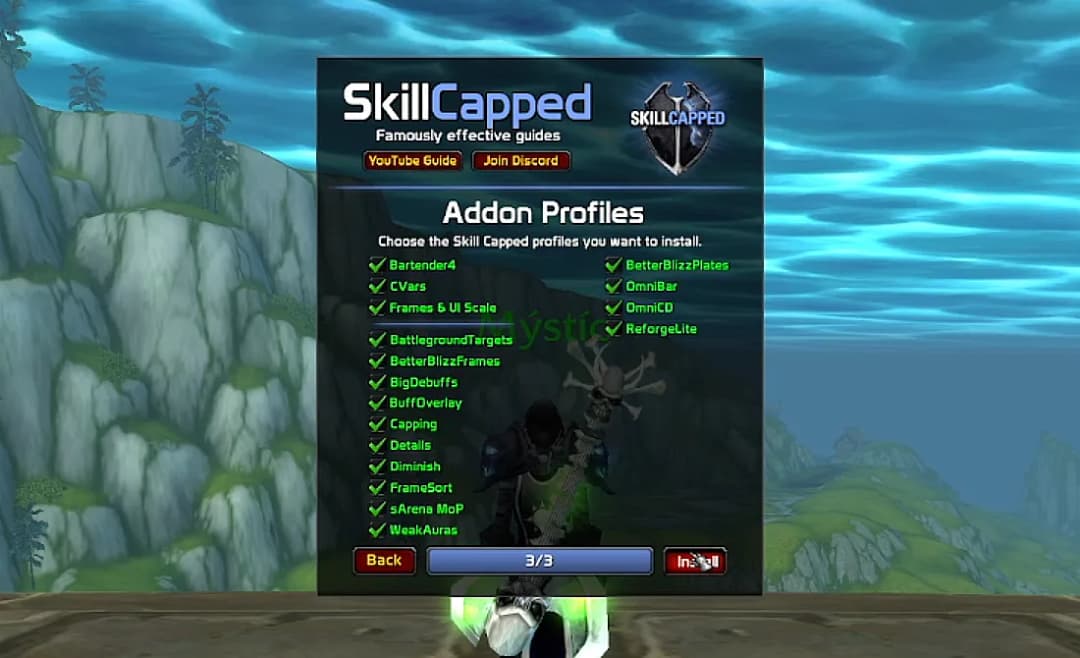
Install Everything Automatically
The Skill Capped Addon is a one-click installer that automatically configures every major PvP addon for MoP Classic. Save hours of setup time.
Get the InstallerArena Frames
We're going to need some arena frames, and there are a few to choose from. Unfortunately at the time of making this guide, Gladius has not yet been fully updated for MoP.
Luckily, sArena is a near 1 to 1 copy of Gladius and works great for MoP Classic.
Download: sArena on CurseForge
Even though this addon is fairly plug-and-play, type /sarena to bring up the options menu. Then press Test to see the frames.
You can choose whatever layout you prefer using the dropdown menu.
Pro Tip: Increase the size of enemy cast-bars, which will make it easier to land interrupts.
Buff & Debuff Tracking
Now we have our unit frames set up, let's optimize them for PvP with proper buff and debuff visibility.
Even if you are the person who HATES addons, there's absolutely nothing to hate about BigDebuffs.
Download: BigDebuffs on CurseForge
This is one of those addons that makes life MUCH easier by increasing the visibility of key buffs and debuffs on different parts of your UI, including:
- Your target and focus frames
- Your raid frames (INCREDIBLY helpful as a healer for quickly dispelling CC)
- Even as a DPS to see CC on your partners, especially your healer
Configuration
Out of the box you will need to change some settings:
Increase Maximum Buffs: If you play a HoT-based healer, you definitely shouldn't play without this simple setting enabled.
Priority Settings: You can adjust the priority of buffs. We suggest making sure CC has the highest priority.
BuffOverlay is so lightweight and useful that there really isn't any reason to play without it.
Download: Buff Overlay on CurseForge
All this addon does is add a simple buff overlay of any major defensive cooldown directly onto the raid-frame.
Since it ONLY tracks defensives, you really don't have to do much configuring and should be safe playing with default settings, but feel free to disable anything if needed.
We don't suggest playing without this, especially as a healer. Since you are already looking at raid frames anyway, this will make it much easier to spot when your DPS uses their major defensives.
Action Bars
While it's technically optional, a good action bar addon will make your life MUCH easier for both customization and keybinding.
We highly recommend getting Bartender for two HUGE reasons.
Download: Bartender4 on CurseForge
Reason #1: Complete Customization
Bartender will allow you to set up your bars EXACTLY how you want to. You can move anything on your screen and even fade out or completely hide those tiny annoyances like the micromenu, which add clutter to your screen.
Reason #2: Quick Keybinding
Bartender makes keybinding a breeze thanks to the quick bind feature. No more needing to fiddle around in the WoW menu. Everything can be bound with a simple highlight of your mouse.
Recommended Setup
We recommend playing with at least 5 bars total:
- 3 on the bottom of your screen
- 2 off to the right
With your bars in place, we suggest grouping abilities into categories like offensive CDs, defensive CDs, utility, and so on. This will make information much easier to pick up at a glance.
Cooldown Tracking
Tracking cooldowns is essential for high-level play. These addons let you see both your party's cooldowns and enemy cooldowns.
If you are an advanced player, we HIGHLY suggest playing with OmniCD.
Download: OmniCD on CurseForge
This addon will allow you to track your party's cooldowns, which is REALLY useful no matter what, especially if you are playing without voice.
- As a DPS: You will be able to see when your teammate has CC ready, allowing you to line up your burst and assist with cross CC too
- As a healer: Knowing what defensives your teammates have available will allow you to make much smarter decisions with your own CDs, especially your PvP trinket
What to Track
For MOST players, tracking cooldowns and CC will be the most important, especially in MoP where coordinated goes are a huge part of setting up kills. We also suggest tracking interrupts too, if you plan on playing without voice chat.
Feel free to be selective on what you track, but remember that balance is key: you don't want to track too little or too much.
Positioning
We suggest anchoring OmniCD to the left side of frames to keep more space open in the center of your screen, while preventing it from overlapping with your Focus Frame.
OmniCD adds a LOT of additional information to track, especially with everything else going on in your screen. This is why we're considering OmniCD optional, better suited for more advanced players.
This is another S tier addon in PvP, allowing you to do the impossible by tracking enemy cooldowns.
Download: OmniBar on CurseForge
This means being able to:
- Juke interrupts
- Play around upcoming defensives
- Predict upcoming CC chains
If you are serious about arena, you NEED OmniBar.
The Big Mistake
Many players make a HUGE mistake with this addon, thinking it's immediately good to go once installed. Not only is there a TON of trash you don't NEED to be tracking, but every cooldown will be clumped together in a giant mess that is IMPOSSIBLE to quickly read at a glance.
Let's fix this.
Step 1: Create Separate Bars
Create different bars to track different types of cooldowns:
| Bar | Purpose | Suggested Location |
|---|---|---|
| Interrupts | Track enemy kicks | Near your cast bar |
| Crowd Control | Track incoming CC | Near your cast bar |
| Major Defensives | Track enemy defensives | Middle area |
| Spell Disruption | Grounding Totem, Spell Reflect | Optional, can merge with interrupts |
Step 2: Filter Out the Junk
If you want to keep your UI as clean as possible, you don't need to be tracking smaller cooldowns. Go through each class and disable abilities that aren't important.
It might seem tedious to split up your bars like this and make all of these filters, but it will be worth it in the long run by making information much easier to digest.
WeakAuras
Our final heavy hitter is, you guessed it: WeakAuras.
Download: WeakAuras 2 on CurseForge
Now there are obviously a lot of WeakAuras and packs to choose from, but we've made things easy for you with perfectly tailored WeakAuras for PvP.
What Our WeakAuras Include
Buff and Proc Tracking: Important buffs and procs displayed directly to the right of your character.
Missing Buff Reminders: If you are missing a buff or if you haven't summoned your pet, you will get a reminder in the center of your screen.
Active Defensives: This section will also display any active defensive cooldowns on your character.
Trinket and Cloak Procs: Tracking for trinket and cloak procs on the left, which are SUPER important in MoP.
Personal Resource Display: An optional display if you are used to it on retail. You can delete this WeakAura if you don't want it.
Reducing Clutter
We know that clutter is the #1 complaint for modern UIs, which is why everything we include perfectly fits together in the center of your screen, minimizing clutter and allowing you to keep your focus on the action at all times.
Additional WeakAuras
- Enemy Cooldown Tracking: One active in arena, another designed for BGs
- Party CC WeakAura: Shows when your partners are stuck in crowd control
- Drinking Alert: Alerts you when the enemy healer is drinking
- Auto Raidmarkers: Automatically adds raid markers to your party
Obviously there is a lot here, so feel free to disable anything you don't plan on using.
UI Alignment & Quality of Life
Now let's get everything lined up on our screen and add some final quality of life improvements.
If you want to be perfect here, make sure to get any working "align" addon.
Download: eAlign on CurseForge
Setup Steps
- Type
/ppain game to show the alignment grid - Go into group finder and start your own custom group (this will allow you to see your raid frames)
- Move your player, target, and focus frames by right clicking them and hitting "unlock" on the dropdown menu
Recommended Layout
We recommend:
- Moving your player and target frame slightly towards the middle of your screen
- Right below them, lining up your party frames with your focus frame
- Keeping both of those in line with your arena frames off to the right
Balance is key here. We want to make sure important information is within our peripheral, but we want to keep the center of our screen a bit open in order to see gameplay.
Summary
| Category | Addon | Purpose |
|---|---|---|
| Stats | ReforgeLite | Perfect stat optimization and breakpoints |
| Nameplates | BetterBlizzPlates | Class colors, indicators, debuff filtering |
| Unit Frames | BetterBlizzFrames | LossOfControl, retail-style frames |
| Arena Frames | sArena | Enemy tracking and cast bars |
| BG Frames | BattleGroundTargets | Enemy tracking in battlegrounds |
| Debuff Tracking | BigDebuffs | CC visibility on frames |
| Defensive Tracking | BuffOverlay | Partner defensive cooldowns |
| Action Bars | Bartender | Customization and quick keybinding |
| Party CDs | OmniCD | Track teammate cooldowns |
| Enemy CDs | OmniBar | Track enemy cooldowns |
| Custom Tracking | WeakAuras | Buffs, procs, alerts |
| Alignment | eAlign | Perfect UI positioning |
| QoL | AdvancedInterfaceOptions | Hidden settings and lag tolerance |
| QoL | FrameSort | Consistent raid frame ordering |
| QoL | LiteButtonAuras | Buff timers on action bars |
If you want to skip ALL of these steps and download the #1 UI for PvP with the click of a button, check out our premium UI package. It includes perfect profiles for every addon mentioned here, plus comprehensive WeakAuras for every spec.

Master MoP Arena with Skill Capped
Premium video courses for MoP Classic
- ✓Complete starter courses: beginner to Gladiator content
- ✓Pro strategies: from R1 MoP Gladiators
- ✓Arena commentaries: learn from high-level gameplay
✦ Exclusive discount applied at checkout • Money-back guarantee